Hello friends! Today we are going to solve Bandit’s levels which are the part of OVERTHEWIRE.It is for the completely beginners who are stepping in CTF challenges.
Level 0-1
The goal of this level is for you to log into the game using SSH. The host to which you need to connect is bandit.labs.overthewire.org, on port 2220. The username is bandit0 and the password is bandit0. Once logged in, go to the Level1 page to find out how to beat Level 1.
To connect with every Level, we will use SSH.
It is a cryptographic network protocol for operating network services securely over an unsecured network. The best-knownexample application is for remote login to computer systems by users.
ssh bandit0@bandit.labs.overthewire.org -p 2220

To listing the all the directories and files. We use ls -la command and look for all the available files. We observe that there is a readme file available that could have valuable information.
By using cat command, we read the readme file and get the flag.
ls -la
cat readme

The above flag is used for connect bandit1.
ssh bandit1@localhost

Level 1-2
The password for the next level is stored in a file called - (dash) located in the home directory.
Again we list the files using ls –la command and we see the ‘-‘ file.
Usually, it can’t read by usual way. For this kind of file named with special characters, it can be read via cat ‘./’ . In the above file, there is a flag.
ls -la
cat ./-
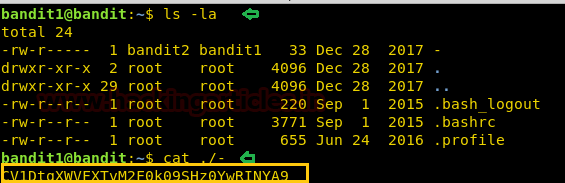
By using above command, the flag will be generated. The above generated flag will be used for connect bandit2.
ssh bandit2@localhost

Level 2-3
The password for the next level is stored in a file called spaces in this filename located in the home directory.
Again, we list the files using ls-la command and cat the text file but here in the file, there are spaces between the words. So we will use single quotes (‘ ’) and then cat command will work.
ls –la
cat 'spaces in this filename'

By the use of above commands, flag will be generated. The above generated flag will be used for connect bandit3.
ssh bandit3@localhost

Level 3-4
The password for the next level is stored in a hidden file in the inhere directory.
Again we will list the files and access the directory named ‘inhere’ using cd command. In next step, we will list the files of ‘inhere’ directory. In this directory, there is a file named .hidden and using cat command, it can be read.
ls -la
cd inhere
ls -la
cat .hidden

The above commands will generate flag and this will be used to connect bandit4.
ssh bandit4@localhost

Level 4-5
The password for the next level is stored in the only human-readable file in the inhere directory. Tip: if your terminal is messed up, try the “reset” command.
Again, ls -la command will be used to list the files and then we will change the directory named ‘inhere’. In this folder, we will use filecommand to check the content of the files. Here, file07 contains ASCII text then, we will use cat command to read the file.
ls -la
cd inhere
file ./*
file ./-file07
cat ./-file07

The above commands will generate the flag, and the above flag will be used to connect bandit5.
ssh bandit5@localhost

Level 5-6
The password for the next level is stored in a file somewhere under the inhere directory and has all of the following properties:
- human-readable
- 1033 bytes in size
- not executable
Again, we will use ls -la command for listing the files and view the directory named ‘inhere’ and then using cd command we will access the directory. In the goal, We can clearly see that there is a file having the 1033 bytes in size which is human-readable. It may be a flag. So, there is command called find and in find there is an option for size. In the screenshot, there is a size of byte 1033c. Here c specifies bytes. And then we can read the file using cat command.
ls -la
cd inhere
find -size 1033c
cat ./maybehere07/.file2

ssh bandit6@localhost
By using above commands, the flag will be generated. This flag will be used to connect bandit6.

Level 6-7
The password for the next level is stored somewhere on the server and has all of the following properties:
- owned by user bandit7
- owned by group bandit6
- 33 bytes in size
In this level the password file is stored somewhere on the server. According to Level Goal, we need to find that file which fulfil the above conditions.
Again, find command will be used here. In the find command, there are options ‘user’ and ‘group’. So, the command will be find / -user bandit7 –group bandit6 –size 33c. Here ‘/’ represents to scan all the files.
The above command will show the password file. There is only one file which has permission to access by the bandit6.
ls -la
find / -user bandit7 -group bandit16 -size 33c


cat /var/lib/dpkg/info/bandit7.password
Now, we can read the password file using cat command.

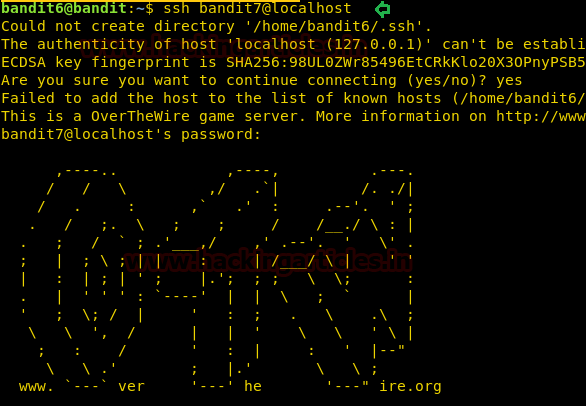
The above flag will be used to connect bandit7.
ssh bandit7@localhost
Level 7-8
The password for the next level is stored in the file data.txt next to the word millionth.
Again, we will use ls –la command to list all the files. According to Level Goal, we need to find that word next to millionth. There is a command called grep which is used to search words, characters, etc. present in the file.
Here, we will use cat and grep command simultanously by using ‘|’(PIPE). The pipe takes previous output as a input for the second command.
ls -la
cat data.txt | grep millionth

The above command will generate flag. And this flag will be used to connect bandit8.
ssh bandit8@localhost

Level 8-9
The password for the next level is stored in the file data.txt and is the only line of text that occurs only once.
SORT command is used to sort a file, arranging the records in a particular order. By default, the sort command sorts file assuming the contents are ASCII.
UNIQ command is used to remove duplicates, show a count of occurrences, show only repeated lines, ignore certain characters and compare on specific fields.
Again, we will use ls command to see the files. We get the file named data.txt. According to Level Goal, We need to find the text that occurred only once. The above commands will help to reach our flag. Combining these commands with cat using pipe. We will reach to our flag.
ls -la
cat data.txt | sort | uniq -u

The above commands will be used to generate the flag. This flag will be used to connect bandit9.
ssh bandit9@localhost

Level 9-10
The password for the next level is stored in the file data.txt in one of the few human-readable strings, beginning with several ‘=’ characters.
Again, we will use ls –la command to view the files and folders. Here, there is also a data.txt file. According to Level Goal, we need to search the string has beginning with several ‘=’ characters. Here also, we will use grep command.

ls -la
strings data.txt | grep '='
By using above commands, we can generate our flag. This flag will be used to connect
ssh bandit10@localhost

Level 10-11
The password for the next level is stored in the file data.txt, which contains base64 encoded data.
Here, we will use ls –la command to view the files which are present in this directory. We can read this file using cat command easily but According to Level Goal, this text is encoded in base64. So, we will decode it by using base64 –d command.
ls -la
cat data.txt
cat data.txt | base64 -d

By using above commands, we can generate the flag. This flag can be used to connect bandit11.
ssh bandit11@localhost

Level 11-12
The password for the next level is stored in the file data.txt, where all lowercase (a-z) and uppercase (A-Z) letters have been rotated by 13 positions.
Here, we will list all the files using ls command and then read by cat command. Since, this text is encoded in ROT-13. So, we will translate it using ‘tr’ command.
ls -la
cat data.txt | tr a-zA-Z n-za-mN-ZA-M

By using above commands, we can generate the flag. This flag can be used to connect bandit12.
ssh bandit12@localhost

Level 12-13
The password for the next level is stored in the file data.txt, which is a hexdump of a file that has been repeatedly compressed. For this level it may be useful to create a directory under /tmp in which you can work using mkdir. For example: mkdir /tmp/myname123. Then copy the datafile using cp, and rename it using mv (read the manpages!).
Here, we will view all the files using ls –la command. Here is also file named data.txt but it is a hexdump of a file. By using cat command, we can verify that it is hexdump or not.
ls -la
file data.txt
cat data.txt

According to Level Goal, we need to make directory in /tmp.
xxdcan convert a hex dump back to its original binary form.
zcat decompresses the data of all the input files, and writes the result on the standard output.
bzip2 is only a data compressor like gzip.
But here, the data.txt file is repeatedly compressed.
mkdir /tmp/Rajchandel
cd /tmp/Rajchandel
xxd -r ~/data.txt > data.txt
file data.txt
zcat data.txt > Raj1
file Raj1.out
bzip2 -d Raj1 [It shows the error and error gives the extension of file]
zcat -d Raj1.out > Raj2
file Raj2
tar -xvf Raj2
file data5.bin
tar -xvf data5.bin
file data6.bin

bzip2 -d data6.bin
file data6.bin.out
tar -xvf data6.bin.out

file data8.bin
zcat -d data8.bin > Raj3
file Raj3
cat Raj3

By using above commands, we can generate flag. This flag will be used to connect to bandit13.
ssh bandit13@localhost

Level 13-14
The password for the next level is stored in /etc/bandit_pass/bandit14 and can only be read by user bandit14. For this level, you don’t get the next password, but you get a private SSH key that can be used to log into the next level. Note: localhost is a hostname that refers to the machine you are working on.
Here, we can view the files using list command. We can see the file named ‘sshkey.private’. It’s a private key which can be used to connect directly.
ls -la

ssh -i sshkey.private bandit14@localhost
